BPMN
What is BPMN? A Practical 2026 Guide

Robbert Schuurmans
BPMN stands for Business Process Model and Notation. It is the international standard for drawing how work actually flows through an organisation, from the first trigger to the final result. If you have ever argued with a colleague about what a box on a flowchart means, BPMN exists to end that argument.
This guide covers what it is, the symbols you need, and how to make your first diagram today. Every diagram below is real BPMN 2.0, not an illustration.
What BPMN actually is
BPMN is maintained by the Object Management Group and standardised internationally as ISO/IEC 19510:2013. That standard is the whole point: an analyst in Utrecht and a developer in Bangalore read the same diagram the same way, with no translation step.
A BPMN model captures three things at once:
The sequence. Which activity follows which.
The roles. Who performs each step, shown through swimlanes.
The decisions. What determines the route through the process.
That is why a BPMN diagram is more than a picture. It is a precise agreement about how work happens, and because it is machine-readable it can be imported into tooling rather than retyped.
The smallest complete process
Every well-formed BPMN process has a beginning, something that happens, and an end. Here is the minimum:
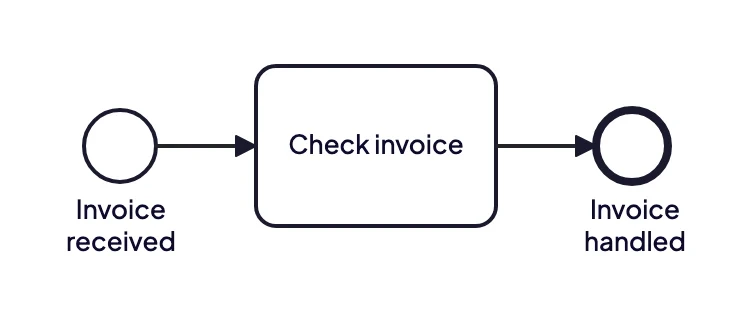
A start event, one task and an end event. That is a complete, valid BPMN process.
Three things to notice, because they are the reading rules for every diagram you will ever open:
Circles are events. Something happens: the process starts, waits, or finishes.
Rounded rectangles are activities. Work gets done.
Solid arrows are sequence flows. They show the order within a process. A dashed arrow is something else, a message flow between participants, which you meet once you start using pools.
The thin circle on the left is a start event. The thick circle on the right is an end event. That border weight is not decoration, it is how you tell them apart at a glance.
Events: start, intermediate and end
Events mark moments. The border tells you which kind:
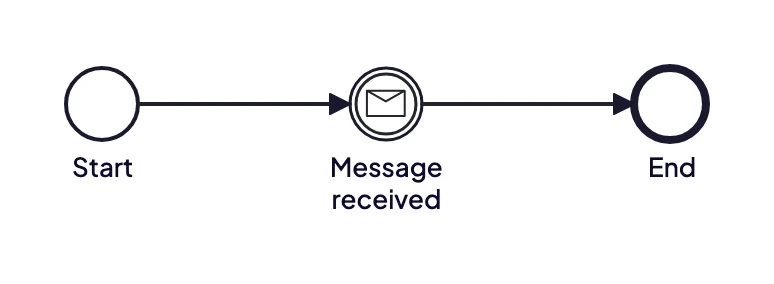
Thin border starts a process, a double border marks something happening during it, a thick border ends it. The white envelope means this event waits to receive a message; a filled one would mean it sends one.
The middle one is an intermediate event. Here it carries a message marker, meaning the process waits for something to arrive before it continues. That single symbol replaces a paragraph of prose explaining what the process is waiting for.
Gateways: where the process decides
A process that only goes in a straight line is rare. Gateways are the diamonds that split and merge the flow.
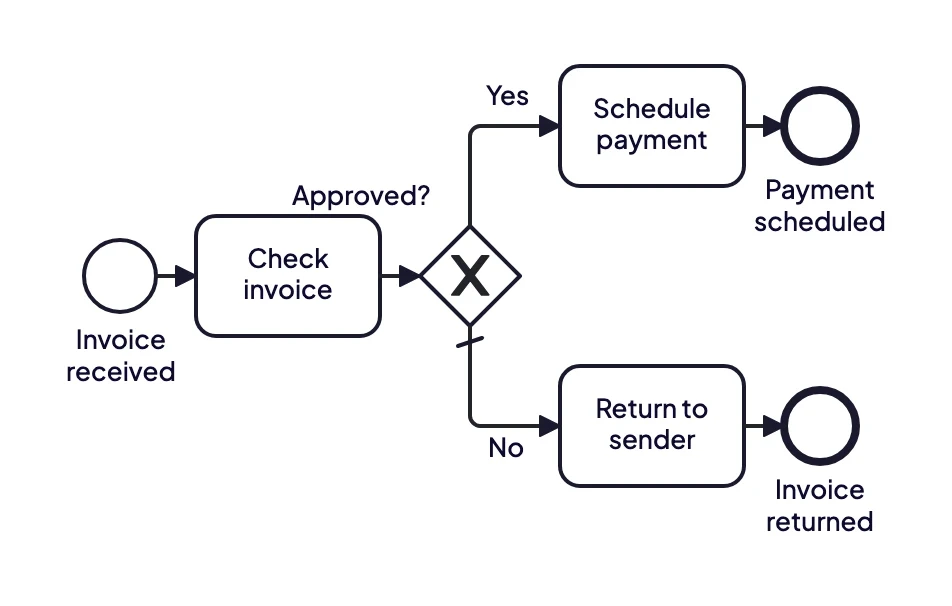
An exclusive gateway. The X means exactly one path is taken, never both. The small slash on the lower flow marks it as the default.
This is an exclusive gateway, written XOR. Based on a condition, the process goes one way or the other. BPMN defines four other gateway types. Three of them, parallel, inclusive and event-based, you will use constantly and they are the part people get wrong most often, so we cover them separately in BPMN gateways explained. The fourth, the complex gateway, is rare enough that most teams never need it.
Two details worth pointing out in that diagram. The slash across the "No" flow marks it as the default: the path taken when no condition matches. Giving an exclusive gateway a default is what stops a process from stalling at a decision it cannot resolve.
The second is that the two branches end in separate end events with different names, rather than being merged back into one. That is deliberate. "Payment scheduled" and "Invoice returned" are genuinely different outcomes, and saying so is more honest than funnelling them into a single "done".
One thing that trips people up: an exclusive gateway does not make the decision itself. It routes on data that was already determined earlier in the process, such as the outcome of the check. The decision logic lives in the process, not in the diamond. (An event-based gateway works differently: it routes on whichever event happens first.)
Activities: where the work happens
An activity is a rounded rectangle and represents something being done. The two you will use constantly:
Task. A single step, such as "Approve order".
Sub-process. An activity that contains a flow of its own. Collapsed, it shows a small [+] marker, so you can hide the detail until someone asks for it.
Name them with a verb and an object. "Approve order", not "Order approval". Active naming keeps the diagram readable and forces you to be specific about what actually happens.
Swimlanes: who is responsible
A pool represents a participant in the process, and lanes divide that pool into roles, departments or systems. They are usually drawn as horizontal bands, and they tie each step to whoever performs it. Put the same process in lanes and the handovers become visible, which is usually where the delays are hiding.
It is also what makes a diagram useful in a migration. One of our customers described exactly this: seeing which part of a process happens in which system, and therefore what they were actually responsible for. Their full account is in the Florinet case study.
For every symbol in the notation, see BPMN symbols and notation.
Why organisations use it
A good BPMN model pays for itself in a few specific ways:
One shared language between business, IT and management.
Faster analysis of the current situation, because ambiguity surfaces immediately.
A basis for automation, since workflow engines and AI agents both need an explicit process definition.
Compliance and handover, because the knowledge sits in the model instead of in one person's head.
That third point is growing fastest. An agent that acts on its own needs boundaries that are auditable and versionable, and a prompt is neither. We wrote about that in BPMN and agentic AI.
How to make your first diagram
Traditionally you drew a BPMN diagram by hand, box by box, after a round of interviews. That takes hours and the result is stale by the time it is approved.
With ModelMatic you record the conversation with the person who runs the process, and a validated BPMN 2.0 diagram comes out in about two minutes. You correct it rather than produce it, which is a faster and more accurate kind of work. One customer measured the difference at four weeks down to two, with the first version around 80 percent correct: the Bovemij case study has the detail.
Start with one process
Pick a process you already know well, ideally one that irritates you. Map the happy path first, then add the exceptions. You will find the disagreements fast, and that is the value.
The official specification is the OMG BPMN 2.0 spec, and bpmn.org is a friendlier overview. When you want the fastest route from a conversation to a model, book a demo and bring one real recording.