BPMN
BPMN symbols: every BPMN 2.0 symbol explained

Robbert Schuurmans

BPMN 2.0 uses a small set of shapes, and each one has a fixed meaning. Circles are events, rounded rectangles are activities, diamonds are gateways, and arrows connect them. Pools and lanes show who does the work. Once you know these groups, you can read almost any process diagram.
This page shows every symbol you will meet in practice, with a figure per group. At the end is a one-table cheat sheet and the mistakes that come up most in real models.
The five groups of BPMN symbols
The BPMN 2.0 specification (also published as ISO/IEC 19510) sorts its symbols into five groups:
Flow objects: events, activities and gateways. These are the steps of the process.
Connecting objects: sequence flows, message flows and associations.
Swimlanes: pools and lanes, which show who is responsible.
Data: data objects and data stores.
Artifacts: text annotations and groups, which add explanation without changing the flow.
Most diagrams use only a handful of these. The specification contains far more variants, but a model a colleague or client can read sticks to the common ones.
Events: circles
An event is something that happens: a request comes in, a deadline passes, an order is delivered. Events are circles, and the border tells you where in the process they sit.
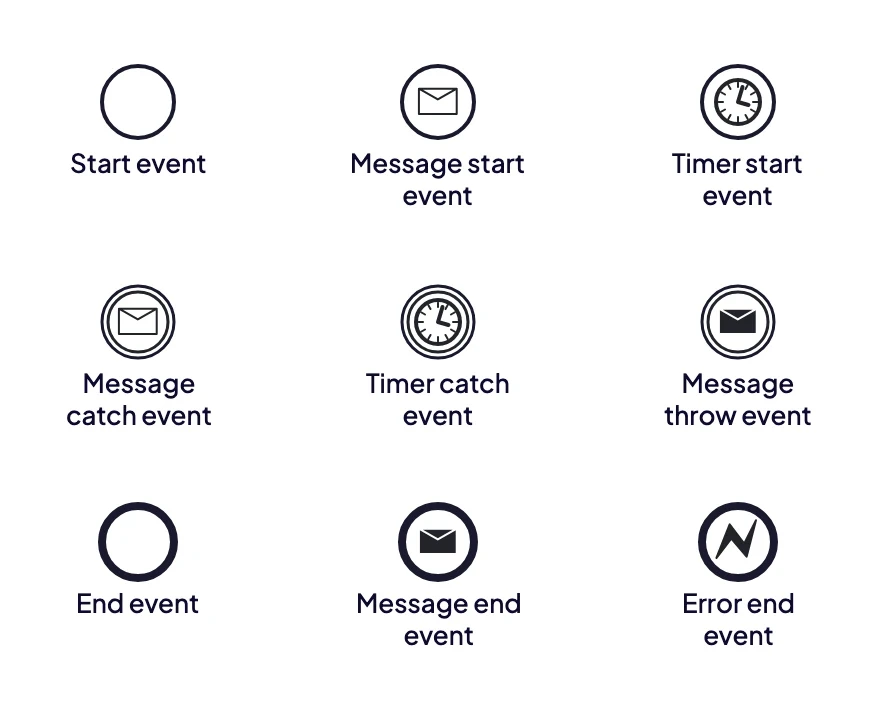
Thin border: start. Double border: intermediate. Thick border: end. The marker inside says what kind of event it is.
Start event (thin border). Where the process begins. Every process has at least one.
Intermediate event (double border). Something that happens along the way, such as waiting for a reply or a timer that runs out.
End event (thick border). Where a path of the process stops.
The marker inside adds the trigger. An envelope is a message, a clock is a timer, a lightning bolt is an error. An outlined marker means the event waits for something (catch). A filled marker means the process sends something itself (throw). So a double circle with an outlined envelope is "wait for a message", and a thick circle with a filled envelope is "end by sending a message".
Activities: rounded rectangles
An activity is work that someone or something performs. It is drawn as a rectangle with rounded corners, with a short verb and object as the name: "Check invoice", not "Invoice".
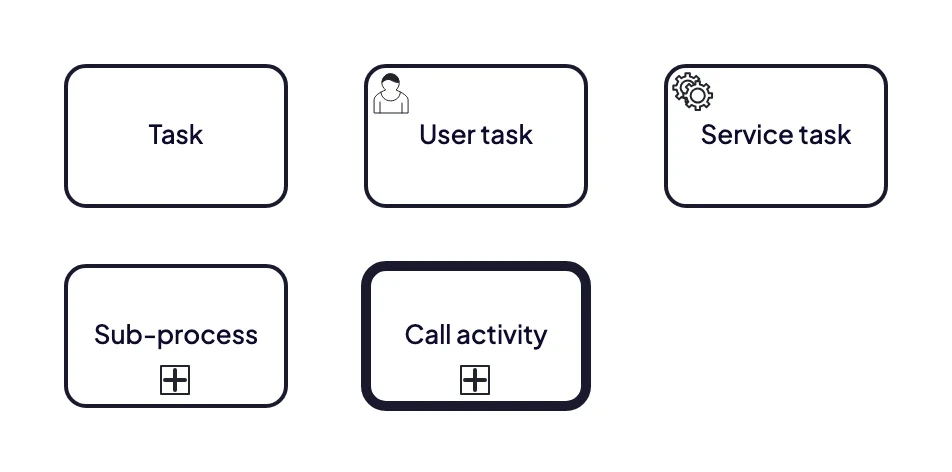
A task is one step. A plus sign means there is a whole process behind it.
Task. One unit of work that is not broken down further.
User task (person icon). A person does the work, usually in a system.
Service task (gear icon). A system does the work automatically.
Sub-process (plus sign). A group of steps folded into one shape. Open it and you see its own process.
Call activity (thick border). Calls a process that is defined elsewhere and reused, such as a standard approval.
For a diagram meant for people rather than a workflow engine, a plain task is usually enough. Only add the icon types when the difference between manual and automated work matters to the reader.
Gateways: diamonds
A gateway is the diamond that decides where the process goes next. It splits one path into several or joins several paths into one. The marker in the diamond is the rule.
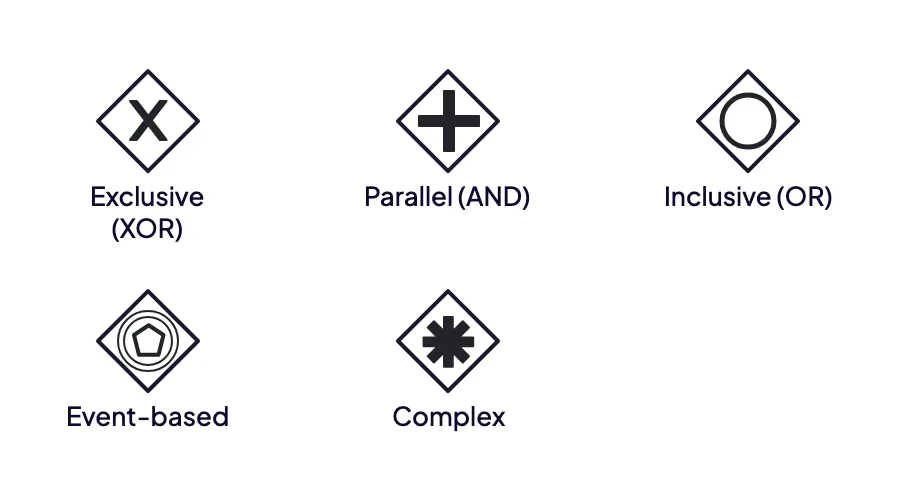
X picks one path, + takes all of them, O takes one or more.
Exclusive (X). Exactly one path is taken, based on a condition. The most common gateway by far.
Parallel (+). All paths start at the same time. The join waits until every path has finished.
Inclusive (O). One or more paths, depending on which conditions are true.
Event-based. The first event that happens decides the path, for example a reply or a timeout.
Complex (*). A custom rule, such as "continue when three of five reviewers approve". Rarely needed.
A gateway does not do work or make a judgement by itself. If someone has to assess something, model that as a task first and put the gateway after it. The guide to BPMN gateways shows each type in a full diagram.
Connecting objects and swimlanes
Three kinds of lines connect the shapes:
Sequence flow (solid line, filled arrowhead). The order of steps within one pool.
Message flow (dashed line, open circle at the start). Communication between two pools, such as your organisation and a customer.
Association (dotted line). Links a data object or annotation to a step. It says nothing about order.
A pool is the process of one party, usually one organisation. A lane is a band inside the pool for a role, team or system. Every step sits in the lane of whoever does it, so you can see at a glance where the work changes hands.
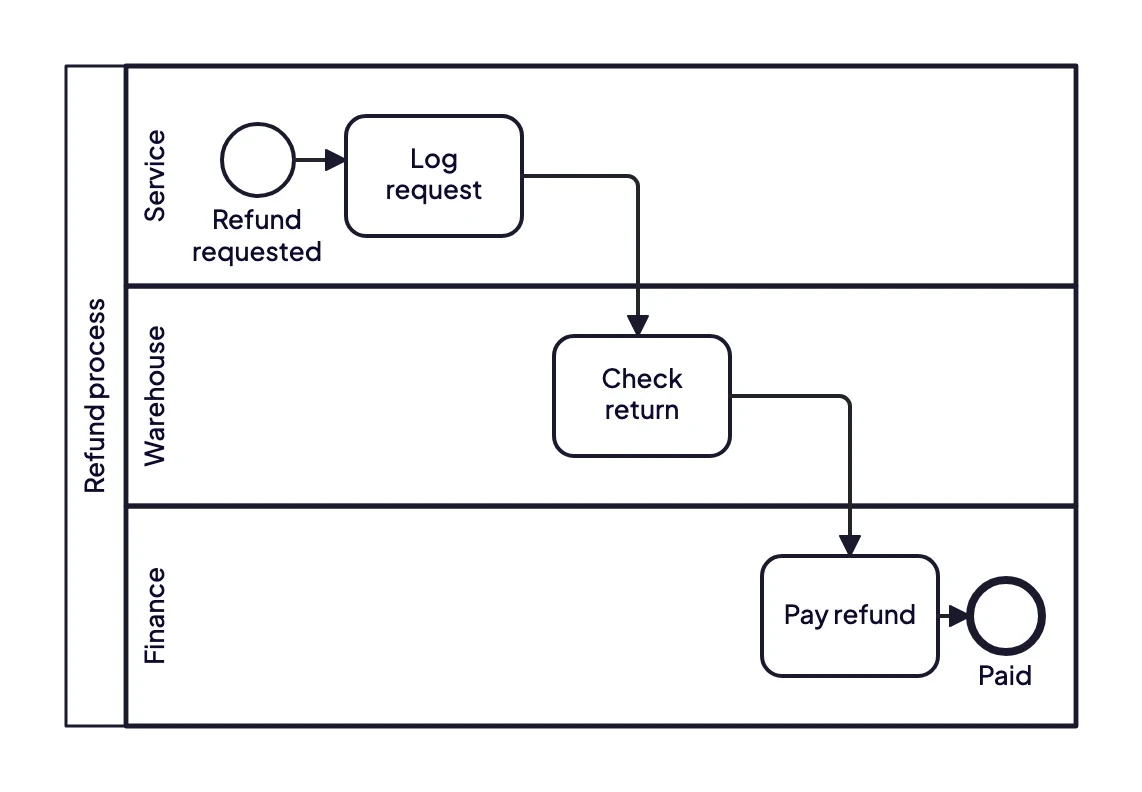
One pool, three lanes. Every sequence flow that crosses a lane border is a handover.
A sequence flow never crosses the border of a pool. Between pools you only draw message flows. That rule keeps your own process separate from what a customer or supplier does.
Data and artifacts
These symbols add information around the flow without changing it.
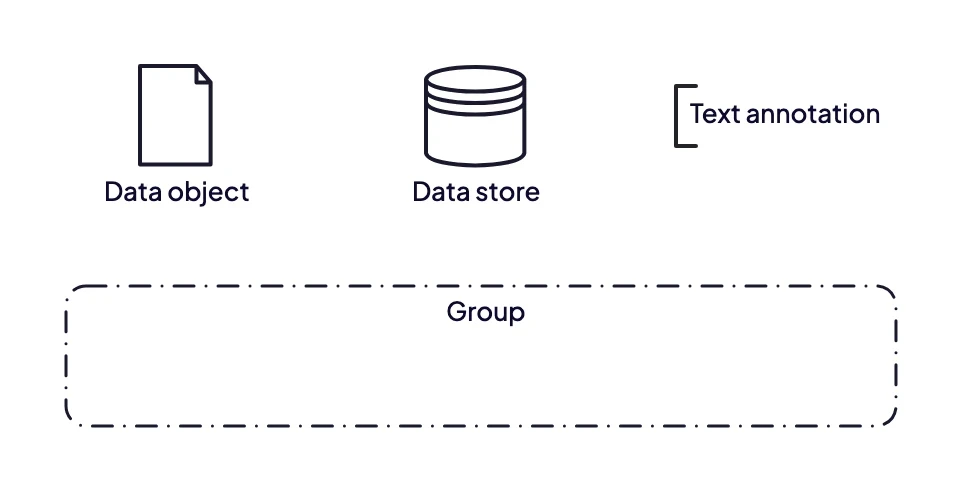
Data objects and stores show what information a step uses. Annotations and groups only explain.
Data object (sheet with a folded corner). A document or piece of information a step uses or creates, such as an invoice or application form.
Data store (cylinder). A place where data is kept beyond the process, such as a CRM or ERP system.
Text annotation (open bracket). A note that explains a step, linked to it with an association.
Group (dashed rounded rectangle). Visually groups steps that belong together. It has no effect on the flow.
BPMN symbols cheat sheet
Start event (thin circle): the process begins.
Intermediate event (double circle): something happens or is awaited along the way.
End event (thick circle): a path ends.
Task (rounded rectangle): one step of work.
Sub-process (rounded rectangle with +): a folded group of steps.
Exclusive gateway (diamond with X): exactly one path.
Parallel gateway (diamond with +): all paths at once.
Inclusive gateway (diamond with O): one or more paths.
Sequence flow (solid arrow): order within a pool.
Message flow (dashed arrow): communication between pools.
Pool / lane (large rectangle / band): party / role that does the work.
Data object (sheet with folded corner): information used or created.
Data store (cylinder): system where data is kept.
Common mistakes with BPMN symbols
Using a gateway as a decision. The judgement is a task ("Assess request"). The gateway only routes on its outcome.
Leaving out the join. Paths that split with a parallel gateway must come together with one too, or the rest of the process may run twice.
Sequence flows between pools. Between organisations you draw message flows.
Start and end with the same border. Thin for start, thick for end. On a printed diagram that is often the only way to tell them apart.
Vague activity names. "Invoice" says nothing. "Check invoice" says what happens.
Too many variants. A model with twenty event types is correct and unreadable. Use the rare symbols only when the reader needs them.
From symbols to a working model
Knowing the symbols is the easy part. The harder part is getting the process right: who does what, where the exceptions are, and what nobody wrote down. For more context on the notation itself, read what BPMN is, or see the symbols in use in the BPMN examples.
ModelMatic turns an interview, transcript or existing document into a BPMN 2.0 model with the correct symbols, and flags unclear points and contradictions so you know what to check with the people involved. Want to see it on one of your own processes? Book a demo.