BPMN
BPMN examples: 6 diagrams for everyday processes

Robbert Schuurmans
Below are six BPMN diagram examples for processes almost every organisation runs: a leave request, customer onboarding, complaint handling, a proposal review, employee offboarding and an IT incident. Each one shows a different part of BPMN 2.0.
The examples are deliberately small. A real process has more steps, but every real process is built from the same patterns. Once you recognise them here, you will recognise them in a model of forty tasks.
How to read these examples
Three shapes do most of the work. Circles are events: something happens, such as a request arriving or a process ending. Rounded rectangles are tasks: work someone does. Diamonds are gateways: points where the flow splits or joins. Arrows show the order. For every symbol in detail, see the guide to BPMN symbols.
1. Leave request: a decision with a default flow
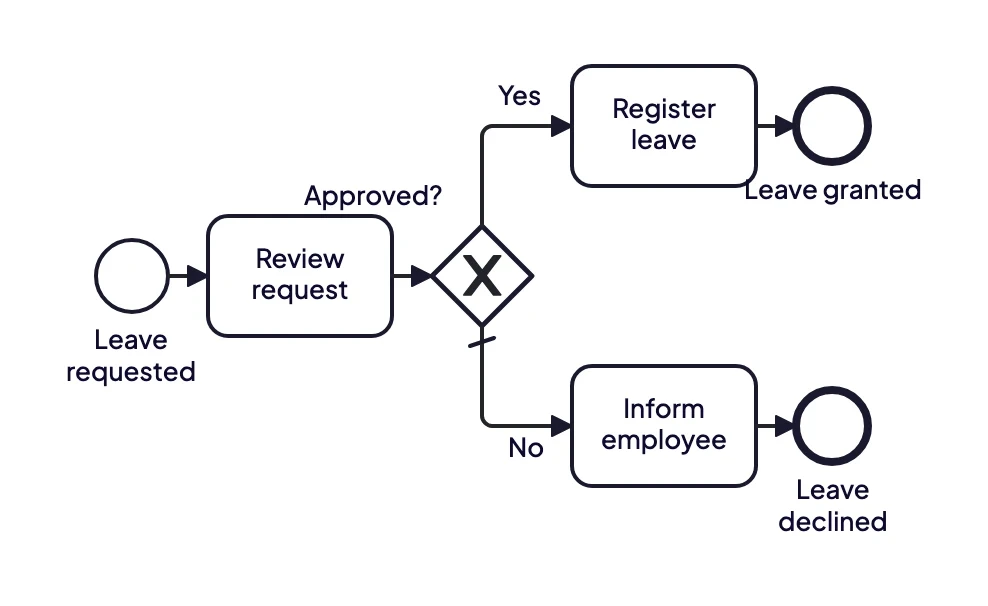
A leave request is reviewed. An exclusive gateway sends it to registration or back to the employee.
This is the most common pattern in any process: do some work, then decide. The review is a task, because someone has to do it. The gateway only routes on the outcome. Note the small slash on the "No" path: that is the default flow, taken whenever the "Yes" condition is not met, so the process never stalls on an unexpected answer. More on this in BPMN gateways explained.
2. Customer onboarding: who does what, with lanes
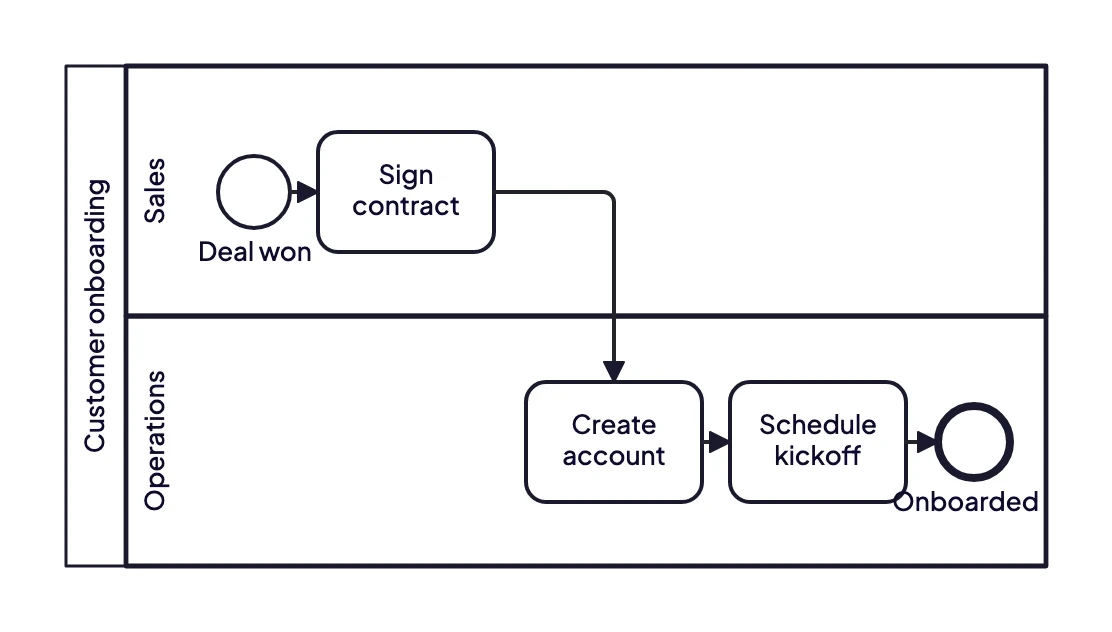
Sales closes the deal and signs the contract. Operations takes over to create the account and schedule the kickoff.
The large rectangle is a pool: the process as a whole. The horizontal bands inside it are lanes, one per role or team. Each task sits in the lane of whoever does it. The value is in the arrow that crosses from one lane to the other. That is a handover, and handovers are where work waits, gets lost or is done twice. In a process analysis, those crossings are the first place to look.
3. Complaint handling: escalate when time runs out
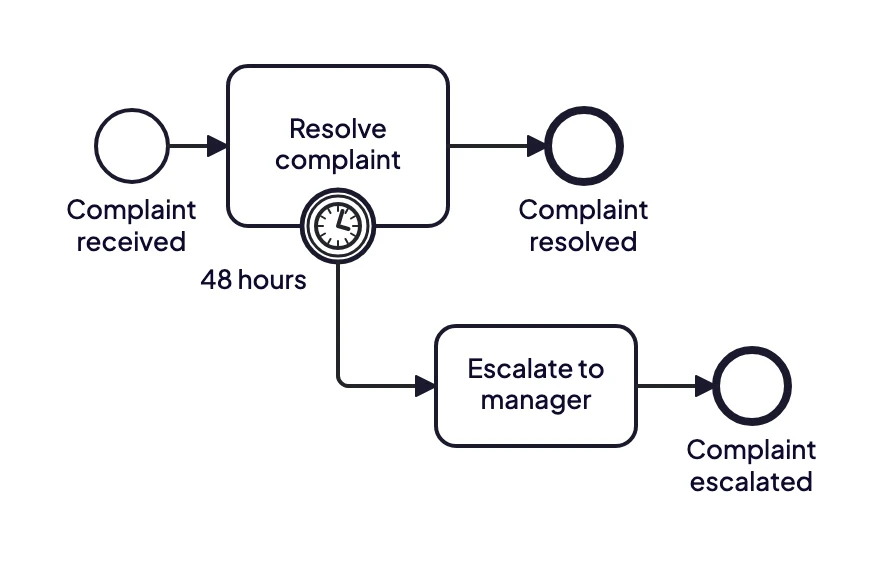
If the complaint is not resolved within 48 hours, the timer on the task fires and the complaint is escalated.
The clock on the edge of the task is a timer boundary event. It watches the task it is attached to. If the task finishes in time, the process ends normally. If 48 hours pass first, the timer fires and the process takes the escalation path instead. Drawn with a solid double circle like here, the event is interrupting: the original task stops. A dashed border would mean the task carries on while the escalation runs alongside it.
4. Proposal review: a loop for rework
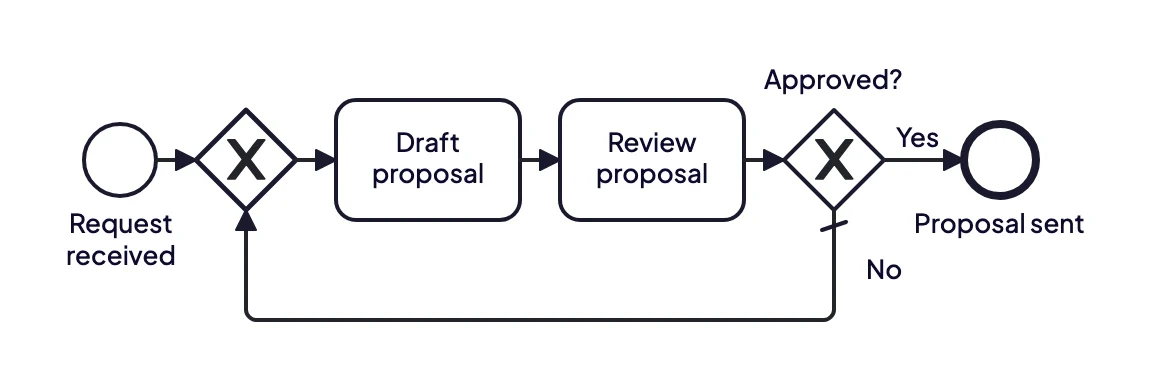
A proposal that is not approved goes back to drafting. The loop repeats until the reviewer says yes.
BPMN has no special symbol for "try again". You draw it as an arrow from the decision back to an earlier point, and let it arrive at an exclusive gateway in front of the task rather than at the task itself. That merge gateway makes explicit that the task can be reached in two ways: the first time, and after a rejection. This is how most review, approval and correction cycles look in practice. When you analyse a process like this, the interesting question is not whether the loop exists but how often it runs, because every extra round is time the customer is waiting.
5. Employee offboarding: three things at once
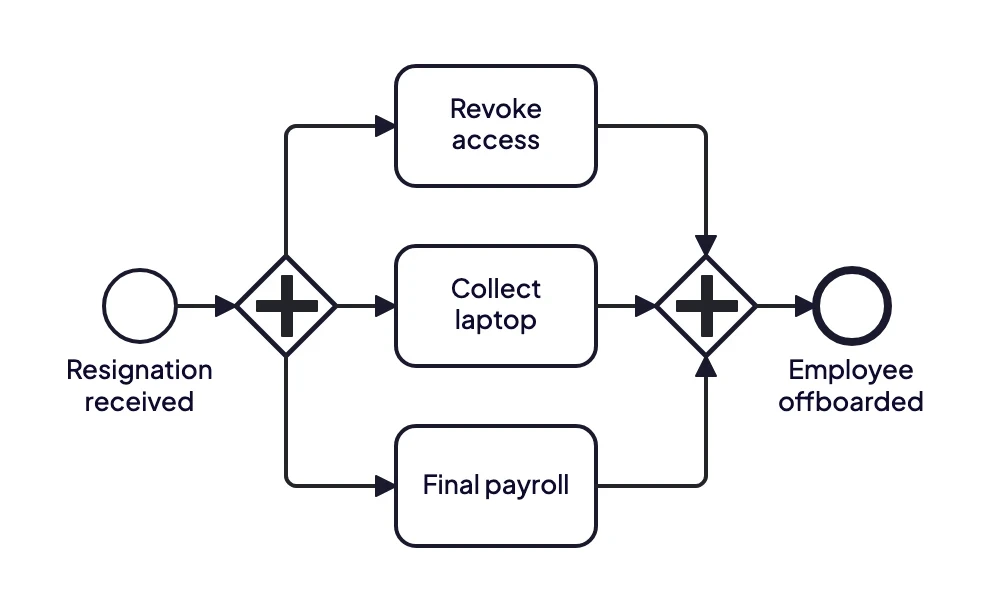
When someone leaves, access, equipment and payroll are handled in parallel. The process ends only when all three are done.
The plus sign marks a parallel gateway. The first one starts all three tasks at the same time, because none of them depends on the others. The second one waits until every branch is finished. Without that second gateway, the process could be marked as done while the laptop is still with the former employee.
6. IT incident: started by a message, recorded in a data store
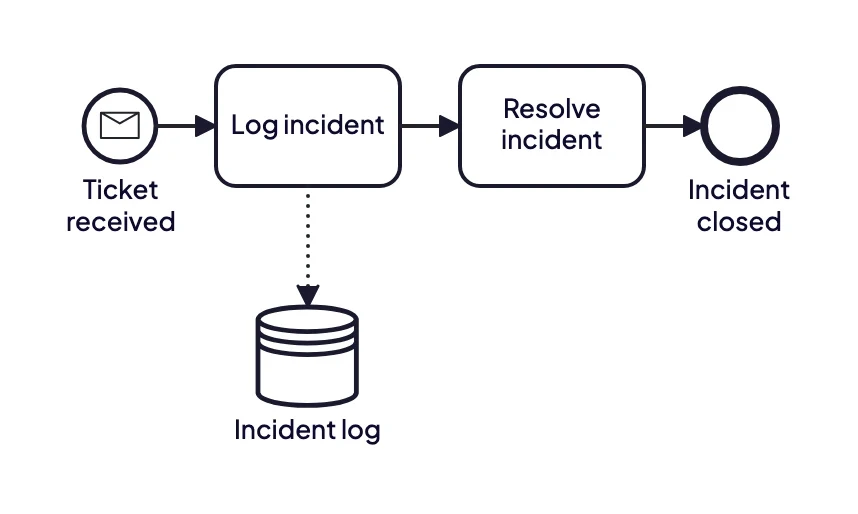
A ticket arrives as a message, the incident is logged in the incident log and then resolved.
The envelope in the start event means the process starts when a message arrives, here a ticket from a portal or an email. The cylinder is a data store: information that outlives a single case, such as a ticket system or database. The dotted arrow shows that the task writes to it. Data in a model is optional, but it makes clear which systems a process depends on, which matters as soon as someone wants to automate it.
From example to your own process
These examples start from a blank canvas. In practice your process already exists somewhere: in people's heads, an old Visio file, a procedure document or an interview recording. ModelMatic turns that material into a BPMN 2.0 model like the ones above, with the gateways and lanes in place and the unclear points flagged for you to check with the process owner.
New to the notation? Start with what BPMN is.
BPMN is maintained by the Object Management Group and standardised as ISO/IEC 19510. The full specification is on the OMG website.