BPMN
Swimlane diagram: who does what in a process

Robbert Schuurmans
Process Innovation

A swimlane diagram is a process diagram divided into lanes, one per role, team or system. Each step sits in the lane of whoever carries it out. At a glance you see not only what happens, but who does it and where the work passes from one party to the next.
That last part is often the reason to draw one. An ordinary flowchart shows the sequence. A swimlane diagram shows the handovers, and handovers are where work gets stuck.
What is a swimlane diagram?
The name comes from a swimming pool: each swimmer stays in their own lane. In a process diagram, a lane is a horizontal (sometimes vertical) band with the name of a role, team or system on the side. That party's steps sit in its band, and arrows show the order.
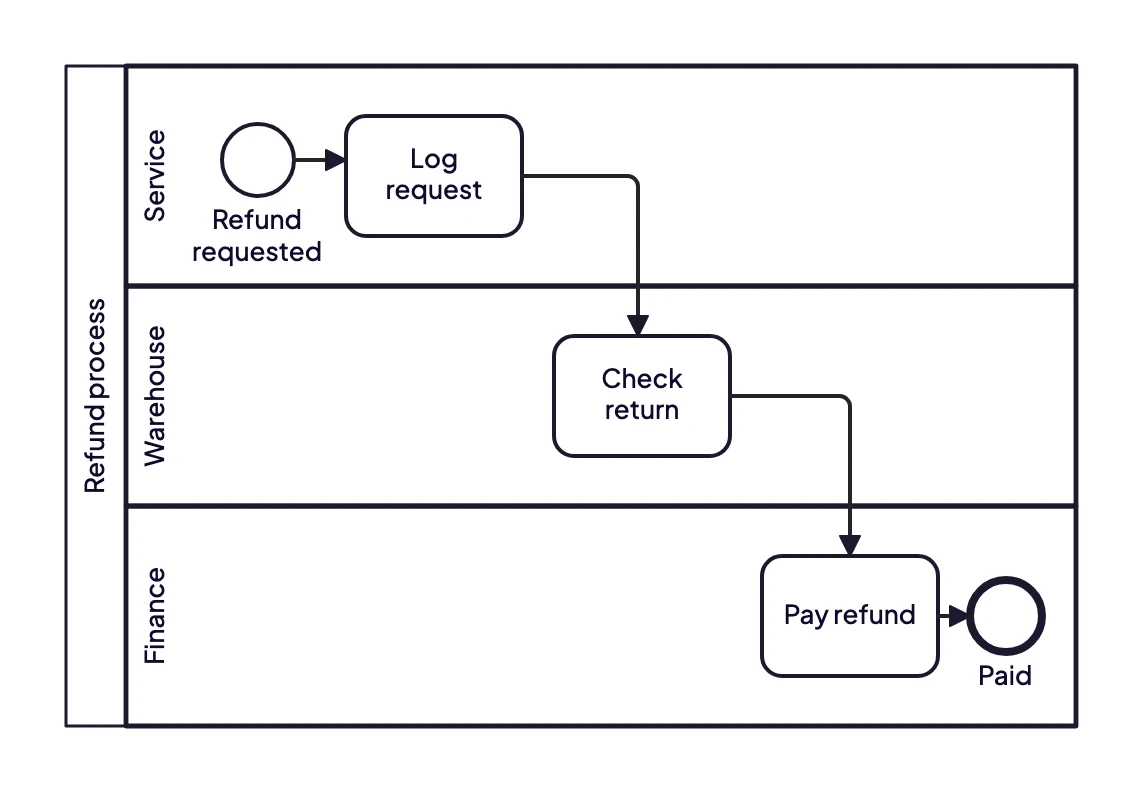
A refund passes through three departments. Every arrow that changes lane is a handover.
In this example a refund passes through customer service, the warehouse and finance. Three steps, but also two handovers. If you want to know why a customer waits ten days for their money, start with those two arrows that change lane.
Why swimlanes work
In an ordinary flowchart a process looks like a straight line. Only when you spread the steps over lanes do you see how often the work changes hands. Every change is a moment where something can get stuck: an email nobody reads, a queue at another team, a question that has to go back.
That is why swimlanes are so useful in a process analysis. They show where responsibility stops and starts again. Count the handovers and you often have a first explanation for a long lead time.
Lanes per role, department or system?
There is no fixed rule, but there is a rule of thumb: choose the level your question is about.
Per department when the question is about collaboration between teams, as in the example above.
Per role when different people within one department make different decisions, for instance an employee and a team lead who approves.
Per system when you want to see where work bounces between applications. Florinet uses this to see how work moves through the many systems its horticulture clients rely on (read the case).
Do not mix them in one diagram. A lane "Finance" next to a lane "SAP" next to a lane "Team lead" is hard to read, because it is no longer clear what a lane means.
Swimlane diagram or BPMN pools and lanes?
Swimlanes are not a separate notation. They appear in flowcharts, in Visio, in Miro. In BPMN 2.0, the standard for process models, they have a fixed meaning.
A pool is the process as a whole, usually of one organisation.
A lane is a band inside that pool: a role, team or system.
Between pools there are no ordinary arrows but message flows. That shows the difference between work inside your organisation and communication with another party.
A customer or supplier is often drawn as an empty pool, a so-called black box: you know they send and receive messages, but their internal process does not belong in your model.
The advantage of BPMN over a loose swimlane flowchart is that the rest of the diagram has meaning too: a diamond is a decision with fixed rules, a circle an event. To learn the symbols, see the guide to BPMN symbols. There is another example with lanes in the BPMN examples.
How to make a swimlane diagram
Choose the process and its boundaries. What starts it, and when is it done?
Decide the lanes. Who is involved? Keep it to five or six lanes, or it becomes unreadable.
Place the start and end. In the lane of whoever starts and finishes the process.
Put each step in the right lane. One step, one owner. If two parties do something together, it is usually two steps.
Draw the arrows and count the handovers. Every arrow that changes lane is a point to ask about: how does the next party know it is their turn?
Have each lane check its own steps. Nobody knows another department's work well enough to draw it for them.
For steps 2 to 4, a brown paper session works well, with one person per department at the wall.
Common mistakes
Too many lanes. With ten lanes the diagram no longer fits a screen and nobody sees the handovers.
People's names as lanes. People change jobs. Use roles.
A step on the border between two lanes. If it is unclear who does something, that is exactly the question the diagram should answer.
Only the happy path. Exceptions often run through different lanes than the standard route, and that is where the work is.
Getting to a swimlane diagram faster
Drawing a swimlane diagram takes less time than working out which step belongs to whom. That comes from conversations, not from a drawing tool. ModelMatic turns an interview or process description into a BPMN 2.0 model with the roles or systems as lanes. Unclear points and contradictions are flagged, so you know what to check in the follow-up conversation.
Want to see one of your processes in lanes? Book a demo and bring an interview recording or process description.