Business Analysis
Fit-gap analysis for an ERP implementation

Simon Parmet
Process Innovation

A fit-gap analysis puts your business processes next to what an ERP package does out of the box. For each process step you decide whether the standard fits or leaves a gap. Every gap then gets a decision: configure, build, work differently or accept it. The result drives the scope, plan and budget of the implementation.
In practice it is also the phase where most implementations start to slip. Not because the analysis is complicated, but because nobody knows exactly how the current processes run when the workshops begin.
What is a fit-gap analysis?
The shape is simple. On one side is how the organisation works or wants to work. On the other is what the new system does as standard. The difference is the gap. You will also see it called a gap analysis or a current state versus future state comparison.
What a fit-gap analysis produces is not a report but a list of decisions. For each gap it says what will happen, who decided and what it costs. That list determines how much custom work the project takes on, and so how expensive it becomes.
Fit-gap or fit-to-standard?
There are two ways into the analysis.
The classic route starts with the organisation. You capture every process and wish, then check what the package can do. The risk: every habit becomes a requirement and every requirement a gap. You end up with a lot of custom build.
Fit-to-standard turns it around. You first show how the package handles the process as standard, then ask why that would not be enough. SAP uses this approach in its implementation methodology, SAP Activate, and most ERP vendors now work the same way.
Fit-to-standard produces fewer gaps, but only if you know the current processes well enough to see where the standard really falls short. Otherwise you accept a standard that misses an exception the business depends on.
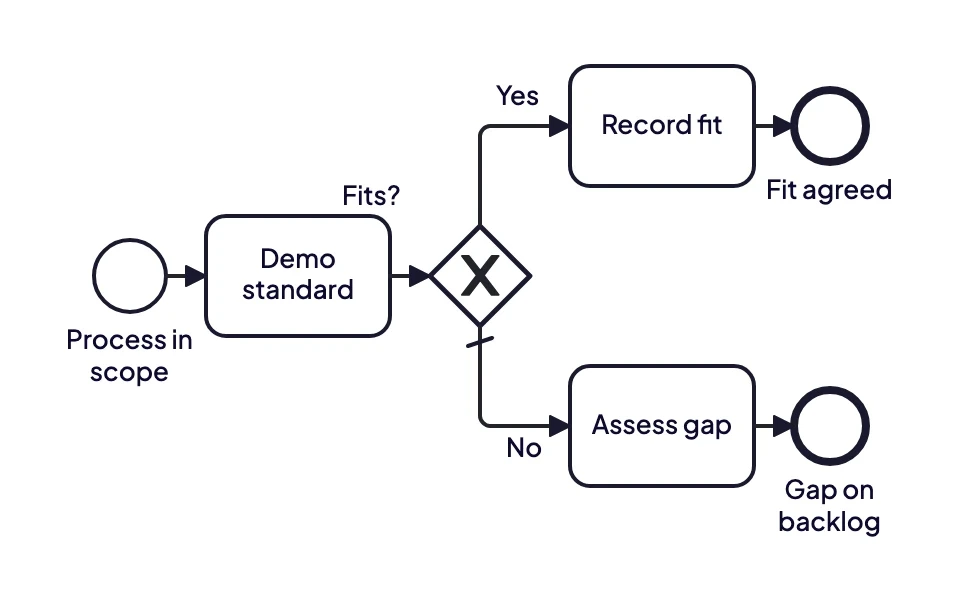
For each process you show the standard first. If it fits, the fit is recorded. If not, the gap is assessed and put on the backlog.
Four kinds of gap
Not every gap costs the same. Sorting them from the start stops everything from turning into custom build.
Configuration. The package can do it, just not in its default setup. Usually cheap and low risk.
Extension. Custom work is needed: an extra field, a report, an integration. It costs build hours and maintenance at every upgrade.
Workaround. The system does not do it and the business covers it with a manual step or another tool. Cheap in the project, expensive in daily operations.
Process change. The business changes how it works so the standard fits. Often the best choice, but only with someone who has the authority to make it.
How to run a fit-gap analysis
Scope in processes, not modules. "Purchase to pay" is a better unit than "the purchasing module", because gaps often sit in the handover between modules.
Capture the current processes before the workshops start. Through interviews or a brown paper session. Not in full detail, but enough to know the exceptions.
Show the standard for each process. Let the people who do the work see the package, using their own example.
Record fit or gap for each process step. With one sentence per gap and its source: who said it, in which session.
Classify and prioritise the gaps. Use the four kinds above and a simple priority such as must, should and could.
Let the process owner decide. A gap without an owner stays on the list until it is too late to act on it.
Where it usually goes wrong
The workshops become as-is sessions. If the current processes are not captured, the fit-gap workshops spend their first hours working out how things run today. The implementation partner waits and the plan slips.
Gaps become a wish list. Without the standard as the starting point, everyone writes down what they would like to be different. The package then takes the blame for choices the organisation never made.
The gap cannot be traced to a process. A line saying "adjust report X" without a reference to the process step it concerns is impossible to judge six months later.
Where the weeks go, and how to shorten them
Most of the time is not in the fit-gap workshops themselves but in the preparation: capturing the current processes across dozens of teams, in a form the implementation partner can read. That work is often underestimated, because it looks like something the organisation should already have.
This is where removing the drawing work helps. ModelMatic turns an interview or existing document into a BPMN 2.0 model with the unclear points flagged, so the workshop discusses the exceptions rather than the process. That is how LBIO mapped forty to fifty processes that had never been documented, in a few days of actual working time, to prepare for replacing SAP R/3 (read the case). More on the documentation side of a migration in SAP S/4HANA migration.
When you can keep it lighter
For a small SaaS package with few configuration options, a full fit-gap analysis is often overkill. A list of the five or six points where the package does not fit, with a decision for each, will do. The full approach pays off for ERP implementations and migrations where dozens of processes and several departments run through the same system.
Want to see how quickly you can get a client's current processes on the table? Book a demo and bring an interview recording or process document.